PRACTICAL INFORMATION FOR EXCHANGE STUDENTS - Spring 2026
Timeline of the semester
|
2026 Spring |
Timeline |
|
in December 2025, by 20 December |
Receiving the Acceptance Letter |
|
after receiving the Acceptance Letter, there is no deadline on BME's side |
Submitting the Learning Agreement for a BME signature |
|
10 December – 12 February, 23.59 |
|
|
9 February, 10.00 |
|
|
on or after 9 February |
Requesting an Arrival Certificate |
|
5 February, 18.00 – 8 February, 11.59 |
|
|
9 February, 18.00 – 22 February, 23.59 |
|
|
9 February – 22 February |
Submitting a 018 Request to register for subjects, if for any reason you cannot register on the course on your own |
|
23 February - 26 May |
Submitting a 018 Request to register for subjects / to drop subjects as you cannot do it on your own |
|
from 16 February |
Requesting a student ID certificate |
|
from 3 July |
Requesting a Departure Certificate |
|
once all your grades are in Neptun and your final LA is accepted by BME |
Requesting a Transcript |
WELCOME PRESENTATION
Welcome presentation 2026 Spring
ACCEPTANCE LETTER
Please check your email regularly in December 2025 as you receive information about the acceptance letter via email by 20 December 2025.
The name of the university
BME: We use the abbreviation of the Hungarian name: Budapesti Műszaki és Gazdaságtudományi Egyetem
NEPTUN
Neptun is BME's academic platform. Set the language to English before you log in. It is important that you check it regularly. You must register for the courses and you will get regular messages through this platform. The access details will be sent to you in the same letter as the acceptance letter information.

Neptun requests
All requests related to your studies and your stay must be submitted through Neptun.
Below is a list of the most important and most frequently used request forms.
All of the forms can be found here: Menu - Administration – Requests - Request Fill


You will probably come across the requests in this order:
100 - Enrolment: Scroll down to Online Enrolment
700 - BME GTK Work and Fire Safety Training: Only for students of the Faculty of Economic and Social Sciences. Information about what to do will be sent to the students concerned.
022 - Request for Preferential Course Schedule: You must submit this request if you cannot participate in the Personal Enrolment
066 - Request for student ID certificate: Scroll down to Student ID Certificate
018 - Request to register for subjects / to drop subjects: Scroll down to Add and Drop Courses During the Semester
027 - Request for a certificate: You can request the following certificates through this form. Scroll down on this page to find the topic you need and see the instructions.
Certificate of Student Legal Status
Learning Agreement - you can ask for a signature from a BME representative
040 - Presentation of document: If you are a student from the EU you must submit your Learning Agreement at the end of your stay. Scroll down to Transcript of Records
Course Offer Spring 2026
Please visit our website for the Spring 2026 course offer of BME.
Learning Agreement (Applicable to Students from the EU)
BME can sign your Learning Agreement once you have received your Letter of Acceptance and Neptun access in December 2025.
- Make sure that the language of the document is English and it is signed by you and your home university.
- Make sure that all the subjects have a proper subject code.
- Note that all BME subject codes start with BME.
BME representative to be written on the LA.
Last name: Toplak
First name: Bianka
Title: Academic Coordinator
E-mail: incoming@bme.hu
There are two ways to have your LA signed by BME.
1. You can submit it in the OLA system if your university is part of the Erasmus Without Papers program.
You will get the digital signature through OLA.
2. You can submit it in a 027 Request for a certificate form via Neptun.
Type of certificate: Erasmus+ Learning Agreement
The signed LA will be sent to you through Neptun.


We CANNOT sign the LA in person during opening hours!
You can contact the faculty's Erasmus coordinator if you have any questions or doubts about the subjects.
Once the course registration period is over, you can add and drop courses using a 018 Request to register for subjects / to drop subjects Neptun request.
If you submit the LA, and then there is a change in your Neptun courses, you must fill out Table A2 of the LA and go through the whole signing process again.
Make sure that by the end of the semester the subjects on your Learning Agreement match the subjects in Neptun 100%.
There is no deadline for submission on our end, but you must submit the final Learning Agreement at the end of your studies in order to get a Transcript.
If you need a template, you can find it here.
Contact
If you have any questions about your mobility, please email Ms Bianka Toplak at incoming@bme.hu.
IT helpdesk
If you experience any issues with university platforms, such as Microsoft 365 email, the eduID login process, or Wi-Fi, please check the availability of the IT department.
ENROLMENT
Online enrolment for students in their first semester: 10 December 2025 – 12 February 2026
Online registration for students in their second semester: 15 November 2025 – 12 February 2026
Personal enrolment: 9 or 13 February 2026 (only for students in their first semester)
Both online and personal registration are mandatory for students in their first semester. Students in their second semester must go through only the online registration.
First day of classes: 16 February 2026
Online Enrolment for students in their first semester
Enter Neptun
Set the language to English before you log in!
Activate the 2026 Spring semester (10 December 2025 - 12 February): Menu – Administration – Term registration – click on ’register’ button – choose: Active (International program)


Download the Enrolment form (12 January - 12 February): Menu – Administration – General forms – Enrolment form – click on the ’download’ button – print 2 copies – sign them in blue ink – scan one copy


Download the study contract (12 January - 12 February) - ONLY IF YOU PAY FOR YOUR STUDIES AT BME
Menu – Administration - General forms – Képzési szerződés / Study contract - click on the ’download’ button - print 2 copies - sign them in blue ink – scan one copy

Menu - Administration – Requests - Request Fill - 100 Enrolment (12 January - 12 February)
- Form of sponsorship: Other or Self supporting student (if you pay for your studies)
- Mode of enrolment: By personal attendance
Attach
- the signed Enrolment form
- your ID or passport copy
- the signed study contract (only if you pay for your studies at BME)


In addition to the online enrolment, you must register in-person.
Very important: You must complete the online registration by midnight (Hungarian time) on 12 February 2026!
You must pay 5.500 HUF (15 EUR) if you submit the 100 Enrolment form after 12 February.
Online Registration for students in their second semester
Online enrolment period: 15 November 2025 – 12 February 2026
Enter Neptun
Set the language to English before you log in!
Activate the 2026 Spring semester (15 November 2025 - 12 February 2026): Menu – Administration – Term registration – click on ’register’ button – choose Active (International program)
Personal ENROLMENT and orientation (only for students in their first semester)
First option
Date: 9 February 2026, Monday
Time: 10.00 (Hungarian time)
Place: BME, building E, first floor, lecture hall B
Address: 1111 Budapest, Egry József street 1.
Please check the Campus map.
Bring the followings:
- two (2) copies of the printed enrolment form signed in blue ink
- your ID card or passport
- two (2) copies of your study contract (only if you pay for your studies at BME)
Second option
Date: 13 February 2026, Friday
Time: 10.00 (Hungarian time)
Place: BME, building E, first floor, lecture hall B
Address: 1111 Budapest, Egry József street 1.
Please check the Campus map.
Bring the followings:
- two (2) copies of the printed enrolment form signed in blue ink
- your ID card or passport
- two (2) copies of your study contract (only if you pay for your studies at BME)
If for any reason you cannot participate in any of the registration dates, you must submit a 022 Request for Preferential Course Schedule form via Neptun.


If you register after 13 February you must visit the Academic Services Centre (ASC) in person in the office hours.
Place: BME, building R, ground floor
Address: 1111 Budapest, Műegyetem rakpart 7-9.
Office hours: https://kth.bme.hu/en/opening-hours/
Bring the followings:
- two (2) copies of the printed enrolment form signed in blue ink
- your ID card or passport
- two (2) copies of your study contract (only if you pay for your studies at BME)
Course Registration During the Course Registration Period
You can (and must) register online from anywhere.
We recommend using a laptop or PC instead of your mobile phone.
We use the 0-24 time format in Hungary. This is important for deadlines.
Preliminary course registration and drop-off period: 5 February, 18.00 (Hungarian time) - 8 February, 11.59 (Hungarian time)
Final course registration and drop-off period: 9 February, 18.00 (Hungarian time) - 22 February, 23.59 (Hungarian time)
There is a short break between the two periods during which you are not be able to enrol/drop subjects. Do not worry, just wait patiently for the start of the second period.
Steps
Enter Neptun
Set the language to English before you log in!
Activate the 2026 Spring semester (if you haven’t done it yet): See Online Enrolment
Course registration: Subject - Register for subject
1. Terms: 2025/26/2
2. Subject type: Subjects from curriculum
3. Subject code / name
4. Curriculum
5. Subject group
6. Language
7. Recommended term
8. Course lecture
9. Course code

Click on the subject.
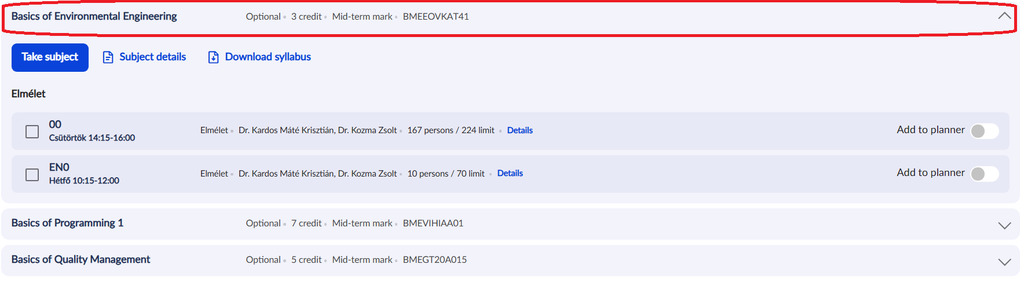
Choose from the English courses, not the Hungarians.
Options depending on the subject (these are only examples):
1. Lecture only - You can and must choose 1 course only.
2. Lecture + Practice - You must choose 2 courses.
3. Lecture + Practice + Laboratory - 3 courses - You must choose 3 courses.
Check the language of the course by clicking on 'Details':

Elmélet = Lecture
Gyakorlat = Practice
Labor = Laboratory
Please note that the abbreviations of the days are in Hungarian, so here are the meanings: H = Monday, K = Tuesday, SZE = Wednesday, CS = Thursday, P = Friday
(Some departments have not uploaded the schedule yet, therefore please check Neptun regularly.)
Tick the box next to the course – click 'Take subject' and 'Comfirm'

Based on availability, you can add courses free of charge during the course registration period.
How to Drop a Course During the Course Registration Period
How to drop a course: Menu - Subject – Registered subjects – Click on the 'Drop' button – 'Click on the Drop' Subject button


Based on availability, you can drop courses free of charge during the course registration period.
Course requirements
Courses at BME can end with either a 'mid-term mark' or an 'exam'.
a) Mid-term mark: a grade is received at the end of the study period based on work completed throughout the study period (homework, projects, teamwork etc.)
b) Exam: the course ends with an exam taken during the exam period
You can check the requirements when registering for the course.
You can check the requirements of your registered courses: Menu - Subject – Registered subjects

NOTE: Course attendance is absolute mandatory, it is a university rule, you can miss 25% of the classes per course.
Add and Drop Courses During the Semester
You can add and drop courses using a '018 Request to register for subjects / to drop subjects' Neptun request.
The request is available: from 18.00 (Hungarian time) on 9 February until 26 May 2026
Submitting the request does not guarantee that the faculty will accept it, especially after the first few weeks of the semester.
The faculty has the right to charge the late add or drop of a subject. The fee is 5.500 HUF per course, not per subject. One subject can have one, two or sometimes three courses.
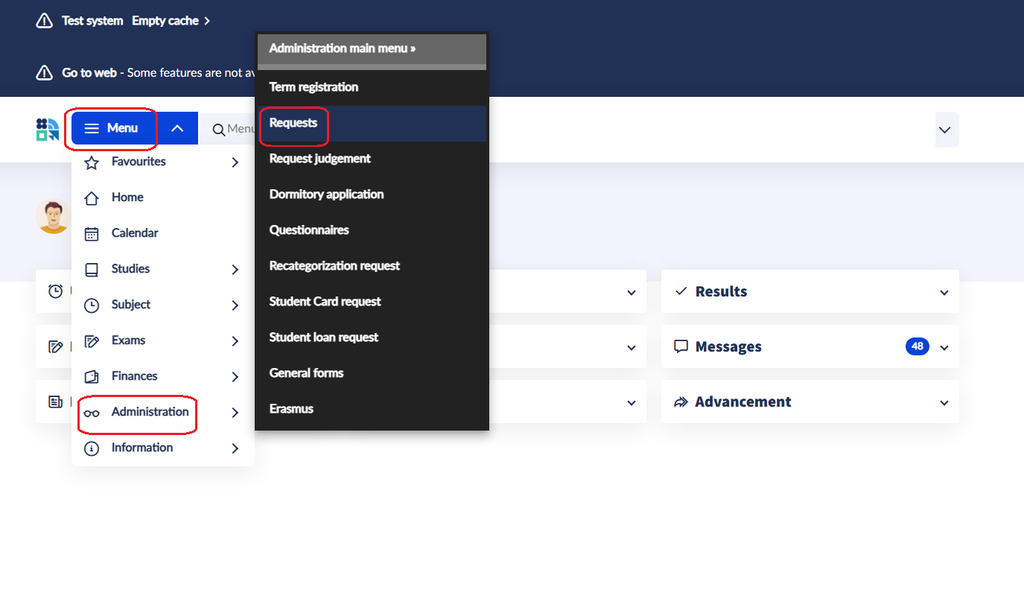
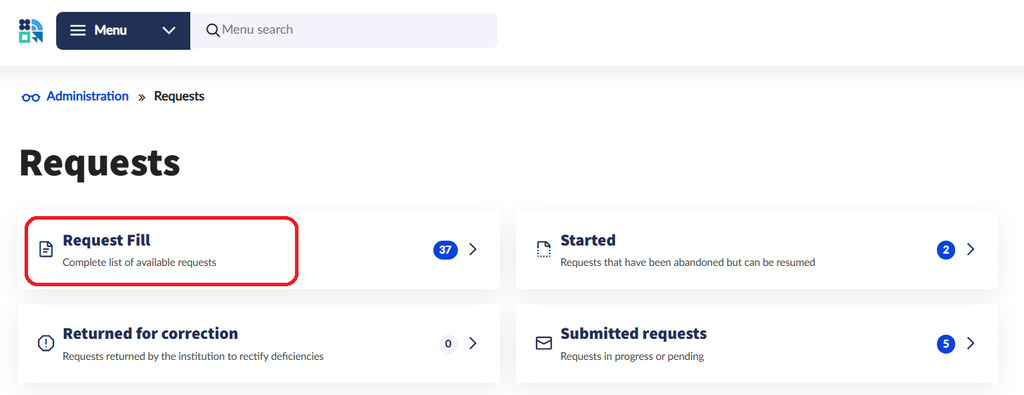

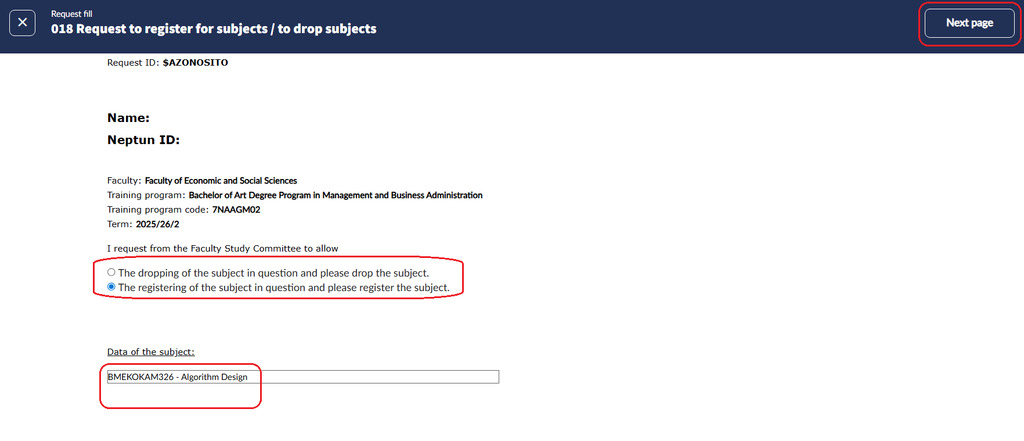

Academic Matters
The Academic Matters website contains all kinds of useful information about your studies, such as what to do if you don't pass a course, what to do if you don't submit an assignment on time, why you cannot register for an exam, how you can make up for a failed midterm exam, and so on.
ARRIVAL CERTIFICATE
There are two ways to get this document.
a) Submit a 027 Request for a certificate form via Neptun.
Type of certificate: Certificate of Arrival/Attendance/Stay
You can attach the form of your home university or we will give you our form if there is no attachment.
You will get the certificate via Neptun.


b) Visit us in person in the office hours and we sign the document you bring or give you our form.
The first day of your mobility is 9 February.
STUDENT ID CERTIFICATE
As an exchange student you cannot get an actual student card, but we can give you a student ID certificate that is valid for 60 days. You must ask for a new one no earlier than 8 days before your current student ID certificate expires.
Submit a 066 Request for student ID certificate form through Neptun.
The submission opens on 16 February 2026.
You will get a Neptun notification when the document is ready, possibly within a week of submission.
You visit us in the office hours and we give you the paper.
IMPORTANT: You can use a student pass on the public transport only with a valid student ID certificate!
Nothing else is accepted by the public transport company and the fine is very high if you use the services without a valid student ID certificate. Be careful!
Purchasing of Budapest transportation pass for students
You can purchase Budapest pass at ticket vending machine or BKK Customer Service Centres.
At purchasing you have to provide an identification number. The accepted ID numbers are the followings:
-
Student ID number
-
Education ID (you may find it Neptun under My Data/Personal Information)
-
The ID number of the certificate (called: igazolás sorszáma) which document is issued by the educational institution in place of a student ID in accordance with the appendix of Government Decree 362/2011 (XII.30.) is only valid together with a photo ID. (Temporary Student ID Certificate sample)
One of these - but only one! - must be entered when you purchase the pass to print the pass. The ticket inspectors will accept any of these numbers on the pass. The main thing is that the pass must be clearly linked to the document that entitles you to the discount and that only one of those numbers is presented on the pass.
With any other questions you may turn to the BKK Customer Service Centres.
THE FIRST DAY OF YOUR MOBILITY
The first day of your mobility is 9 February.
THE LAST DAY OF YOUR MOBILITY
The last day of your mobility is 3 July.
DEPARTURE CERTIFICATE
The last day of your mobility is 3 July 2026. You can request a departure certificate on or after this date. However, if you request it at any time before this date then, the issue date of the document will be your departure date.
There are two ways to get the document.
a) Submit a 027 Request for a certificate through Neptun.
Type of certificate: Erasmus departure certificate
You can attach the form of your home university or we will give you our form if there is no attachment.
You will get the certificate via Neptun.

b) Visit us in person in the office hours and we sign the document you bring or give you our form.
TRANSCRIPT OF RECORDS
You can get the Transcript of Records ONLY IF all the followings are fulfilled.
You must submit the final Learning Agreement signed by all parties (student, sending university, BME) through a 040 Presentation of document request after 26 May 2026.
The subjects in the LA must 100% match the subjects in Neptun.
Once the 040 request is approved and your Learning Agreement is accepted by BME, you can do the followings, but not before.
You can ask for the Transcript through a 027 Request for a certificate BUT ONLY IF
- all your grades are registered in Neptun
- you do not have any debts towards the university
You will get the document through Neptun.
If you do not fulfil the above-mentioned requirements, your request will be rejected.
The Learning Agreement part of this rule only applies to students coming from universities that are part of the Erasmus program and must have a signed Learning Agreement.
FINANCES
Extra fees for special instances
|
Instances |
Fees |
|
registering/dropping a course via a 018 request between 9 February – 26 May 2026 |
5.500 HUF/course |
|
late submission of the 100 enrolment form between 12 February – 15 March 2026 |
5.500 HUF |
|
late submission of home assignment |
2.500 HUF/assignment |
|
repeated resitting of a test |
4.500 HUF/resitting |
|
unverified absence from an examination |
5.500 HUF/absence |
|
3rd and further exam in the same subject |
4.500 HUF/exam |
|
late payment of an inflicted fee |
1.400 HUF/fee |
You can find more information on the financial obligations on our Finances page.
ACADEMIC CALENDAR
RULES AND REGULATIONS
Faculty coordinators
|
Faculty |
Coordinator’s name |
Coordinator’s email |
|
Faculty of Architecture |
Anikó Bosánszki |
|
|
Faculty of Chemical Technology and Biotechnology |
Dr Márton Kőrösi |
|
|
Faculty of Civil Engineering |
Dr Balázs Kövesdi |
|
|
Faculty of Economic and Social Sciences |
Tamara Demkó |
|
|
Faculty of Electrical Engineering and Informatics |
Dr Péter Kiss |
|
|
Faculty of Mechanical Engineering |
Dr Csaba Hős |
|
|
Faculty of Natural Sciences |
Dr József Kolumbán |
|
|
Faculty of Transportation Engineering and Vehicle Engineering |
Dr Ádám Török |